最近项目需要实现可视化绘制DAG即有向无环图,经过几个方案的调研,最终选择了jsPlumb.
jsPlumb本身分Tookit付费版及Community社区版,因核心功能社区版都已具备,且开源社区本身的活跃度更为方便未来的开发维护等,所以选择社区版。
学习渠道
学习一个技术,官方文档,官方社区,谷歌搜索,是你最需要依重的.
这里啰嗦,贴下地址
除了这些官方资料,看一些博文也能有不小帮助,正如我这里写的,愿能帮到你些。
使用
我的实际项目前端框架是Angular,所以这里代码是是在此背景下的写法,但应不怎么影响大家去借鉴,毕竟思维,理念都差不都,毕竟都是JS。
先了解jsPlumb绘图的几个概念
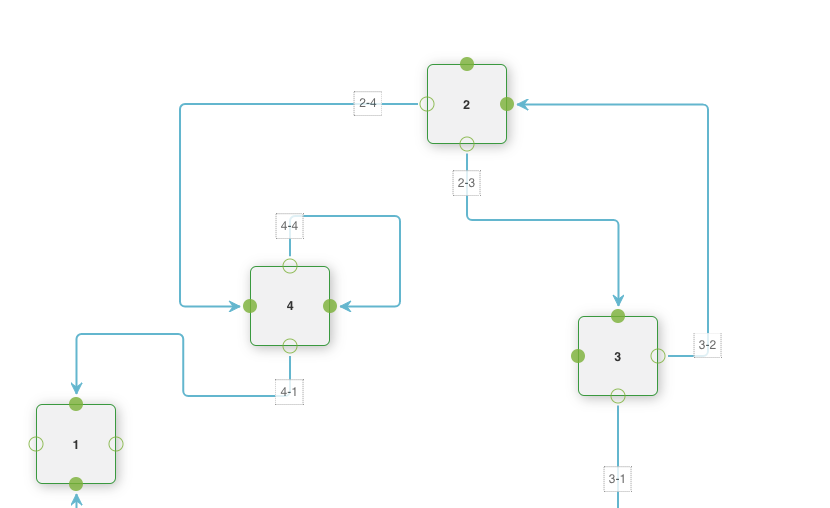
端点 端点,是指,我们图上可以有几个连出去或者连进来的可视化点
锚点
锚点指的是端点可以最终落下的位置,也就意味着,一个端点,可以指定多个锚点位置,根据实际的图形位置,灵活落在某个锚点上。
连线 我们通过连接建立多个Window即节点之间的关联,比如我们用贝塞尔曲线,还是流程图那种的折线,这些就需要设定连接器
覆盖物 解决绘制与连接之上的UI问题,比如标签,或者箭头等
强调:其实,很多时候,很容易误解锚点和端点的概念,我也走了点弯路
上例子
已实现功能
- 动态添加节点
- 动态删除节点
- 动态连边
- 动态删边
- 节点拖拽监听
- 节点及边,右键菜单
第三方组件jquery.contextMenu实现
Show me the code
import {Component, ElementRef, OnInit, Renderer2, ViewChild} from '@angular/core';

declare let jsPlumb: any;
declare let $: any;

@Component({
    selector: 'app-jsplumb',
    templateUrl: './jsplumb.component.html',
    styleUrls: ['./jsplumb.component.css']
})
export class JsplumbComponent implements OnInit {


    jsPlumbInstance: any;
    @ViewChild('canvas') public panel: ElementRef; // 画板


    constructor(private renderer: Renderer2) {
    }

    ngOnInit() {
        this.draw();
    }

    draw() {
        this.jsPlumbInstance = jsPlumb.getInstance({
            // default drag options
            DragOptions: {cursor: 'pointer', zIndex: 2000},
            // the overlays to decorate each connection with.  note that the label overlay uses a function to generate the label text; in this
            // case it returns the 'labelText' member that we set on each connection in the 'init' method below.
            ConnectionOverlays: [
                ['Arrow', {
                    location: 1,
                    visible: true,
                    width: 11,
                    length: 11,
                    id: 'ARROW',
                    events: {
                        click: function () {
                            alert('you clicked on the arrow overlay')
                        }
                    }
                }],
                ['Label', {
                    location: 0.1,
                    id: 'label',
                    cssClass: 'aLabel',
                    events: {
                        // connection.getOverlay("label")
                        tap: function () {
                            let label = prompt('请输入标签文字:');
                            this.setLabel(label);
                        }
                    }
                }]
            ],
            Container: 'canvas',
            ConnectionsDetachable: true
        });
        const basicType = {
            connector: ['Bezier', {curviness: 100}],
            paintStyle: {stroke: 'red', strokeWidth: 4},
            hoverPaintStyle: {stroke: 'blue'},
            overlays: [
                'Arrow'
            ]
        };

        this.jsPlumbInstance.registerConnectionType('basic', basicType);

        // 支持拖拽
        this.jsPlumbInstance.draggable('flowchartWindow1');
        this.jsPlumbInstance.draggable('flowchartWindow2');
        this.jsPlumbInstance.draggable('flowchartWindow3');
        this.jsPlumbInstance.draggable('flowchartWindow4');


        // 增加端点
        this.jsPlumbInstance.addEndpoint('flowchartWindow1', sourceEndpoint);
        this.jsPlumbInstance.addEndpoint('flowchartWindow2', targetEndpoint);

        // listen for clicks on connections, and offer to delete connections on click.
        //
        this.jsPlumbInstance.bind('click', function (conn, originalEvent) {
            // if (confirm("Delete connection from " + conn.sourceId + " to " + conn.targetId + "?"))
            //   instance.detach(conn);
            // conn.toggleType('basic');
            console.log(conn);
            console.log(originalEvent);
        });

        //
        this.jsPlumbInstance.bind('connection', (connInfo) => {
            this.addMenu4Edge(connInfo);
            console.log(connInfo);
        });

        this.jsPlumbInstance.bind('connectionDetached', (connInfo) => {
            console.log(connInfo);
        });

        this.jsPlumbInstance.bind('connectionDrag', function (connection) {
            console.log('connection ' + connection.id + ' is being dragged. suspendedElement is ', connection.suspendedElement, ' of type ', connection.suspendedElementType);
        });

        this.jsPlumbInstance.bind('connectionDragStop', function (connection) {